2026-06-26 · 3 min read
One short link for all your links: link-in-bio on BLNQ.
Flip a switch and a normal short link becomes a tidy link-in-bio page: your profiles and links as branded buttons, with a click count on each. Not a separate product, just a link mode. On every plan.
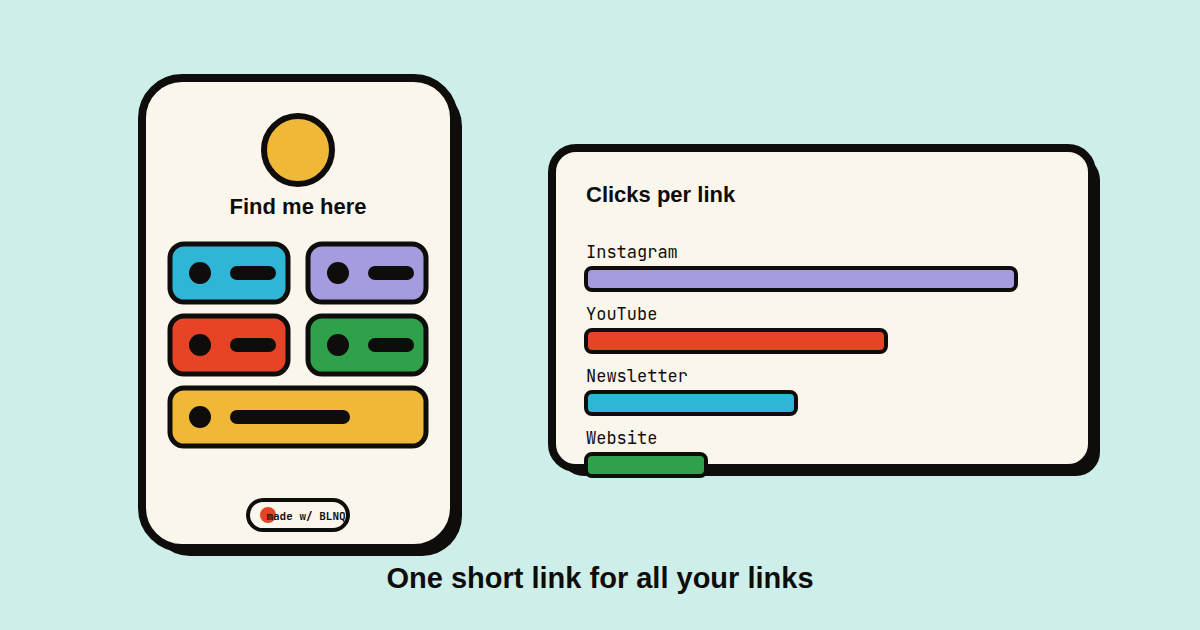
"Link in bio" is a whole category of product, which always seemed like a lot of app for what is, fundamentally, a short page of buttons. So we didn't build a separate product. We made it a mode on a link you already have.
Turn one link into a page
Open any link's editor, go to Routing, and flip on Link-in-bio page. Instead of redirecting, that short link now renders a clean page of buttons. Add a row per destination, give it a label, and pick what it is: a social platform (Instagram, TikTok, YouTube, X, and the rest get their real icon) or a plain website. That's the whole builder. No drag-handle gymnastics, no themes gallery.
Branded, and actually yours
It inherits the BLNQ look without being loud about it: chunky outlines, an accent colour you pick, two buttons per row so a phone screen isn't mostly empty. Add an avatar if you want one. The heading is yours to set, or leave it blank and there's no title at all. Pinned to the bottom of every page is a small, clickable "Made with BLNQ" with the fox, the one piece of branding, and it links back to us rather than sitting in your face as a watermark.
Every tap is a tracked click
This is the part a static bio page can't give you. Each button routes through the redirector before it bounces to its destination, so every tap is a real BLNQ click. The builder shows a count next to each link, which profile people actually open, not just how many landed on the page. Same analytics engine as the rest of your links.
What it isn't
It isn't a website builder and isn't trying to be. No custom fonts, no embedded video, no storefront. If you need those, you need a different tool. If you need one link that points at all your other links and tells you which ones get tapped, this is exactly that and nothing more.
It's in every link's Routing tab, on every plan, Free included. Toggle it on, add a couple of buttons, and share the short link (or its QR) wherever you'd put a "link in bio."